User Analysis Discussion
Send questions to: thwang@cs.stanford.edu
Last
updated:
December
10, 1998
4.1 User Characterization:
This system’s users are not a particular identifiable set within the population. Users of all types will interact with the system. However, it is valid to characterize them for the purpose of analysis based on their expected attitude and psychology when interfacing with the system. Notwithstanding, the characteristics may not describe an individual user in the least.
This system’s users are spatial/intuitive. They will respond to pictures and explore the system’s physical environment to form a correct mental model of the system. Their attitude toward the system is neutral and motivation to use the system is low. They perceive the system as a method to use to obtain a goal. Their positive response to the system depends solely on its ability to perform a familiar task efficiently and they would not perceive any value to the system beyond that.
Although their task is familiar, their system experience, task experience, and application experience is low. They are used to performing the function without a computerized user interface and are not familiar with a system for this task that has one. Their computer literacy is low, although they have high experience in other types of “walk up and use” systems.
The system expects users with low typing and low computer literacy characteristics. For this type of task, the users would learn quickly with only moderate exploration.
4.2 Task Analysis:
The model of the task involves one user performing the goal of filling up with gas at a gas station and paying for it quickly. The interaction involves one user and the system with an exceptional interaction with an attendant.
The situation of concern however is the desire of the gas station operator to provide additional service to the customer. The system serves this desire by informing the customer by advertising these additional services.
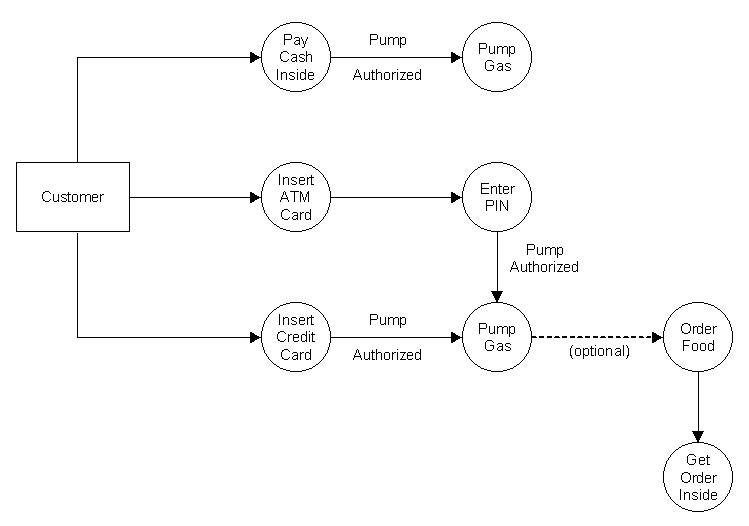
Appended to the original activity (purchasing, paying for and pumping gas) is the activity of deciding to accept an additional service (fast food). Next comes the activity of efficiently receiving and paying for the additional service.
The task was modeled by team members actively participating in purchasing small amounts of gasoline with various credit and debit cards at numerous stations. Reflecting on the experience of numerous slightly different styles of “pay at the pump”, the team was able to speculate about user psychology and characteristics.
4.2.1 Data Flow
Diagram:
4.3 Workload Analysis:
Users are not under any duress when they perform this task. Under normal circumstances the environment is friendly and while speed and efficiency are important for the system’s success, the users are free to perform at their own pace in familiar, easily accessible surroundings.
Complete knowledge of the system is easily acquired with one use.
4.4 Environmental Considerations:
Risks to successful system use include inclement weather where the user stations are located. Direct sunlight can effect the legibility of the screens.
The success of the system absolutely depends on the proper functioning of the hands free gasoline nozzle. The marketing effect of the system is voided if the user must focus on keeping gas flowing into the tank. The opportunity that the system is targeting is the time while the customer is outside the car and waiting for the pump operation to complete. With an open mind and clear view of the pump screen, the user can be informed and hopefully entertained by the operation of the system’s display.
4.5 Dialogue/Interaction Styles:
There are several types of dialog styles: menus, fill-in forms, questions and answers, function keys, direct manipulation, natural language and command language.
Menus are most appropriate for users with negative attitude and low motivation, requiring little typing skills and little system experience from users. Users with low task experience, low application experience and low computer literacy have the ability to handle menu systems. Furthermore, menus are good for those users who have little training and would like to have alternative means of using the system (discretionary use). In an environment where there is high turnover rate, the menu dialog style is a good candidate for system UI design.
Based on the user profile characteristics, the menu dialog style is a valid option particularly due to the fact that the system will need to handle a selection of food menu items.
Like menus, fill-in forms are most appropriate for users with negative or neutral attitude and low motivation. As far as knowledge and experience are concerned, fill-in forms are for users of moderate to high typing skills, with little to moderate system experience. These users have little to moderate application experience and have obtained moderate to high computer literacy. Job and task wise, fill-in forms are for users in a system of moderate to high frequency of use. Similar to menus, fill-in form systems allow users to have choices other than what is provided. In such a system, the task importance should be moderate, while the task structure is high.
In reality, fill-in forms are linked with systems dealing with surveys or registration, which does not fit our gas station environment. Moreover, our proposed system does not require the users to have typing skills before they pump fuel or order food, which is necessary for a fill-in form interface.
Question and answer interfaces are suitable for users possessing a negative attitude and low motivation towards our proposed system. In terms of knowledge and experience, this kind of interface is for users with moderate to high typing skills, but with little to moderate system experience, low task experience, low application experience, and moderate to frequent use of other systems. In lieu of the job and task characteristics, the question and answer style is for a system with a low frequency of use whose users have received little or no training. These same users also have discretionary use of the system. They are working on a pre-designed fixed set of jobs of fixed steps whose task importance is fairly low.
Like the fill-in form interface, the question and answer interface requires users to type in an answer thus necessitating high typing skills, which is not a requirement of our system. Thus, the question and answer interface is inappropriate for our proposed gas pump system.
In terms of user psychology, function key interfaces can accommodate a wide range of users: from negative to positive attitude, from low to high motivation. As for knowledge and experience, a function key interface system does not require high typing skills. Users with low to high system experience, moderate to high task experience, moderate application experience, and low to high use of other systems can all equally enjoy the benefits of this particular interface. In regards to job and task characteristics, function key interfaces are good for the following conditions: low to high frequency of use, users of little or no training, discretionary use, low to high turnover rate, low to high task importance, low task structure, and limited task domain.
Altogether, the function key style fits several aspects of our customer’s profile. More specifically, the function key interface is self-explanatory, requires little human memory, easy to use, flexible, and requires little or no screen “real estate” (which is absolutely critical for our system since the gas pumps really don’t have much display area). However, there is an inherent hindrance for us to adopt this style: it offers a very limited number of keys whereas food-ordering systems require a large number of choices. Should we strictly use a function key interface, this would translate into more depth and less breadth, which is would not make for a suitable user interface. For this reason the system uses a hybrid interface. It is composed of both a function key interface and a menu style interface, which allows the system to utilize the advantages of a function key interface throughout the majority of the process, while conferring the benefits of a menu style interface for the food ordering portion of our system.
Direct manipulation interfaces are easy to use since they are essentially WYSIWYG (What You See Is What You Get). These interfaces are appropriate for users with negative attitude and low motivation. They are also suitable for users with low typing skills, moderate system experience, moderate to high task experience, and high frequency of use of other systems. With direct manipulation, users are not required to have much computer literacy. When it comes to job and task characteristics, direct manipulation interfaces are implemented in a system which has low usage and whose users have moderate training while retaining discretionary use of the interface. These users tend to have high turnover rate. They mainly work on unimportant tasks and tasks themselves do not have preset sequences.
Direct manipulation nearly fits every category of our user profile characteristics, however, our gas pump system will operate based on a reasonably fixed sequence of steps. In other words, users will not have the option to randomly make selections during the process. For example, users cannot order food prior to ordering fuel with the logic being that gas pump utilization is intended for the primary use of patrons who want to fuel their automobiles. Should a user desire to exclusively order food, then he may park to the side and place his order inside the mart. Based on our system’s fixed sequence of steps, direct manipulation does not appear to be the best candidate for our system’s UI interaction design style.
Natural language interfaces serve the same group of users as direct manipulation, as far as user psychology is concerned (negative attitude and low motivation). In terms of knowledge and experience, these users have high typing skills, low system experience, high task experience, low application experience, and high frequency of use of other systems. These users are involved in jobs and tasks with the following characteristics: low frequency of use, little or no training, discretionary use, high turnover rate, low task importance and low task structure
Command language interfaces, on the other hand, are most appropriate for users with a positive attitude and high motivations. Users of this system have achieved moderate to high typing skills and high system experience. Furthermore, these users posses high task experience, high application experience, and high computer literacy. The interface itself is frequently used and users of the system usually have formal training and stay with their system/jobs for a long period of time. The jobs they perform are important and the jobs can be carried in a fairly flexible manner.
Both natural language and command language systems require typing skills from users. In order to use these two types of systems, users should possess a fairly reasonable amount of knowledge of the system syntax. Additionally, factors such as high motivation and flexibility essentially eliminate these two system options as our design style.
The users of the new system
will have the following profile:
1) They will not be
highly motivated (low motivation) to become expert users of our system.
2) They will rely
on spatial or intuitive recognition to utilize our system.
3) They will possess
a neutral attitude towards the new system.
4) The new system
assumes that users will have fifth to twelfth grade reading skills.
5) No typing skills
shall be required.
6) Our users will,
in all likelihood, have experience with similar gas pump systems, but may
be first time users.
7) The display language
will be in English only.
8) Due to the fact
that the new pump is so easy to use, it will not require any training and
is open to the general public.
9) The whole process
shall be completed in a relatively fixed sequence, in other words, it will
be highly structured. 10) Color-blindness should not impose any difficulty
for our users.
11) Handedness will
not impact a user’s performance on our system.
12) Both male and
female customers will operate the new gas pump interface.
Based on the analysis of the various dialog styles and user profiles, a hybrid interface composed of both a function key interface and a menu style interface was selected as most appropriate for our proposed system.
4.6 I/O Device Selection:
The I/O device is integrated with the gasoline pump. Each pump will have a screen to allow convenient access for the ATM/Credit card customer and the visibility desired by the station operator for promoting his additional services. There is room on the top of many manufactured pumps to have a screen 2 ½ times the size of current pump top screens. Key pads for PIN passwords for ATM cards will be replaced with touch screen popups for PIN entry thereby saving space on the top of the pumps where the screens are located.
Touch screen devices will allow a natural platform for a function key/ menu style.
Additional I/O devices include a small profile statement printer at the pump. The receipt contains a numbered ticket to connect the holder to an order placed and assists in delivering the product to the correct customer.
A large screen, card reader and statement printer takes about half of the real estate available on the top of the pump. The rest of the pump top can then be used for instructions, attendant call button and speaker, gasoline gallon register, dollar cost registers, and pump grade selection buttons.